



Get answers, not
runaround.
Search setup guides, firmware fixes, and support resources by entering keywords below.
Adding a user
- On the NVR, right click and go to the Settings Option select Settings Login.
- Once in the Settings Menu select User.
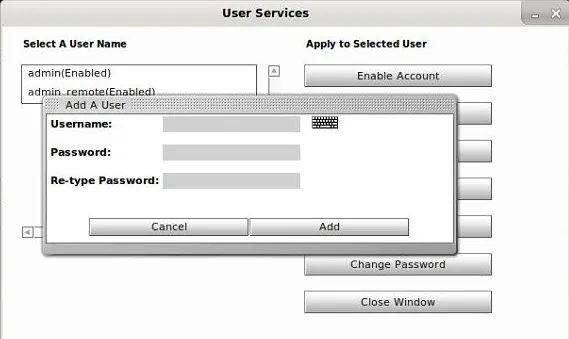
- Select Add User, you will then be asked to fill out the below fields, once complete press ok to add your new user:
- Username: the name of the user.
- Password: the password for the unit.
- Re-type Password: re-enter your password to make sure it is correct.
Deleting a user
- On the NVR, right click and go to the Settings Option select Settings Login.
- Once in the Settings Menu then select the User option.
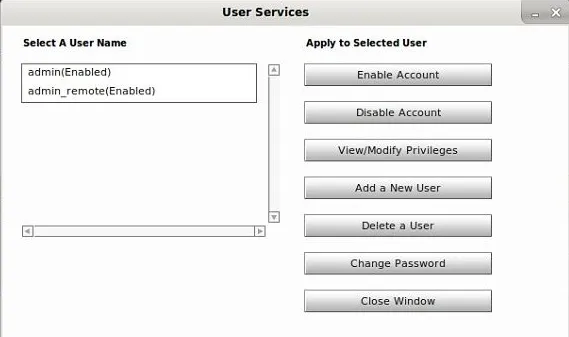
- Your list of users are down the left-hand side.
- Select the account you wish to delete (you cannot delete the admin user as this is the system default) then press Delete a User.
- Press OK to confirm deletion.
Changing a Password
- On the DVR, right-click and go to the Settings option select Settings Login.
- Once in the Settings menu then select the User option.
- Your list of users are down the left hand side, select the account you wish to change.
- Select Change Password.
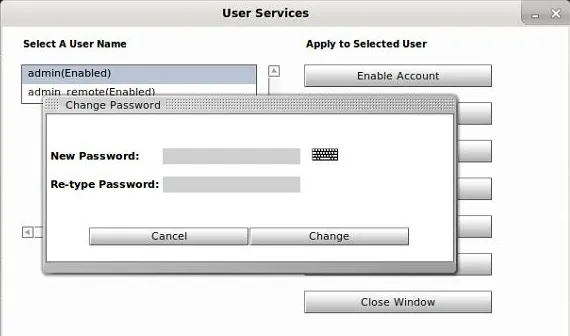
- Enter new password in the New Password field, repeat in the Re-Type Password field.
- Press Change to save the password.
Need Additional Help?
Our dedicated support desk is available to assist you 24/7.
Popular Articles
Frequently viewed documentation and technical guides.